> ## Documentation Index
> Fetch the complete documentation index at: https://bigbluebutton.com/docs/llms.txt
> Use this file to discover all available pages before exploring further.
# Accessing the Administrator Panel
> It it important to note that only user(s) who have been assigned the Administrator role have access to the Administrator Panel. Once you are logged...
## It it important to note that only user(s) who have been assigned the Administrator role have access to the Administrator Panel.
Once you are logged in as an Administrator your account drop down will have a new option titled **Organization:**
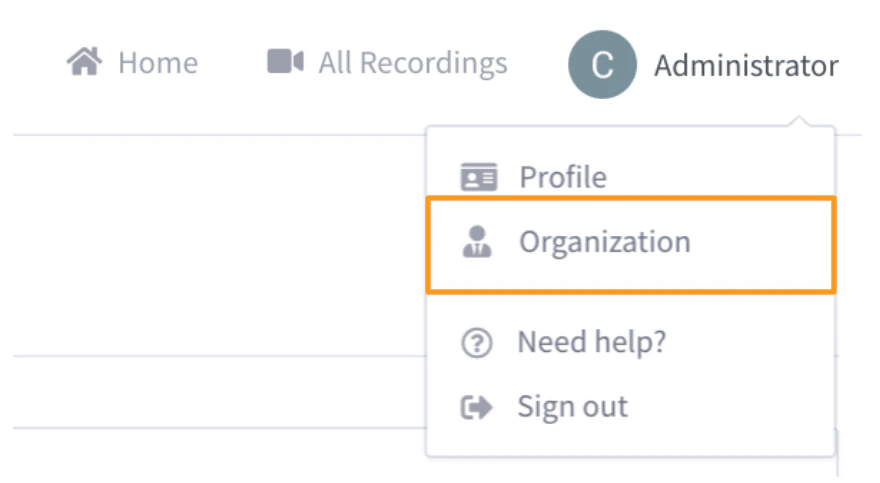 When selected, your Organization Settings menu will open. There are four sub-menus in total (located to the left of the Manage User panel):
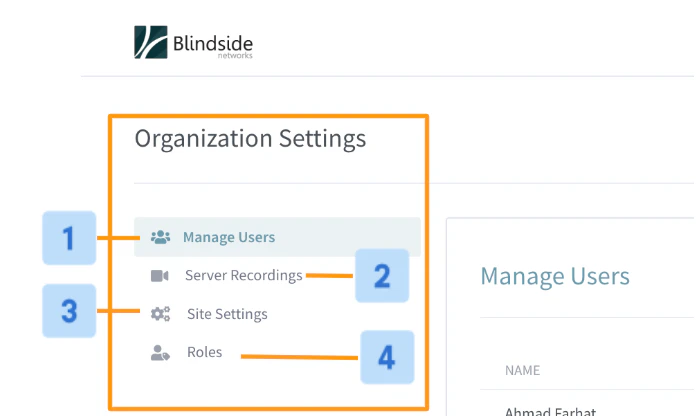 **Manage Users \[1], Server Recordings \[2], Site Settings \[3],** and **Roles** **\[4]**
* **Manage Users \[1]:** quickly manager users and accounts associated with your Personal Rooms instance.
* **Server** **Recording \[2]:** easily access all recordings associated with Personal Rooms.
* **Site Settings \[3]:** customize your Personal Rooms instance. Set a logo, theme colour, and registrations methods (to name a few).
* \*\*Roles \[4]: \*\*edit or create new roles and assign permissions.
**Manage Users \[1], Server Recordings \[2], Site Settings \[3],** and **Roles** **\[4]**
* **Manage Users \[1]:** quickly manager users and accounts associated with your Personal Rooms instance.
* **Server** **Recording \[2]:** easily access all recordings associated with Personal Rooms.
* **Site Settings \[3]:** customize your Personal Rooms instance. Set a logo, theme colour, and registrations methods (to name a few).
* \*\*Roles \[4]: \*\*edit or create new roles and assign permissions.