> ## Documentation Index
> Fetch the complete documentation index at: https://bigbluebutton.com/docs/llms.txt
> Use this file to discover all available pages before exploring further.
# Learning Challenge
> Moderators can run a live, timed quiz during a session to check understanding, watch responses come in, and share results by name or anonymously.
Moderators can run a Learning Challenge — a live, timed quiz — during a session for quick checkpoints and formative assessment. By combining active recall with spaced repetition, a challenge improves learning outcomes while keeping the class engaged.
Here's a quick overview video of how it works.
There are four steps to running a Learning Challenge.
1. **[Use AI to generate questions](#1-use-ai-to-generate-questions)** ahead of your class.
2. **[Paste in the questions](#2-paste-in-the-questions)** and set the time limit.
3. **[Start the challenge](#3-start-the-challenge)** and monitor the live results as students submit their answers.
4. **[End the challenge](#4-end-the-challenge)** and share the results with student names or pseudonyms.
## 1. Use AI to generate questions
As shown in the video above, you can use your favorite AI to generate a formatted list of questions on any topic — anatomy, algebra, English, or anything else you teach.
Here are three examples to get you started.
```text theme={null}
Generate 4 grade 7 English questions. Make them all have a single correct answer using MULTIPLE_CHOICE.
OUTPUT REQUIREMENTS:
- Return ONLY valid JSON—no markdown, no code fences, no explanations
- Start with [ and end with ]
SCHEMA:
[
{
"questionText": string (the question),
"questionAnswer": string (1-2 words maximum),
"questionType": "TEXT" | "MULTIPLE_CHOICE",
"questionMetadata": { "options": [4 strings] } // ONLY for MULTIPLE_CHOICE
}
]
RULES:
1. Questions must be age-appropriate and match the topic and level requested above
2. Include at least one MULTIPLE_CHOICE question
3. The correct answer MUST appear in the options array for MULTIPLE_CHOICE
4. TEXT answers must be 1-2 words only
5. No trailing commas
6. Use double quotes for all strings
EXAMPLE OUTPUT:
[{"questionText":"What is Brazil's capital?","questionAnswer":"Brasília","questionType":"TEXT"},{"questionText":"What ocean borders Brazil?","questionAnswer":"Atlantic","questionType":"MULTIPLE_CHOICE","questionMetadata":{"options":["Pacific","Atlantic","Indian","Arctic"]}}]
```
```text theme={null}
Generate 4 grade 9 Algebra questions.
OUTPUT REQUIREMENTS:
- Return ONLY valid JSON—no markdown, no code fences, no explanations
- Start with [ and end with ]
SCHEMA:
[
{
"questionText": string (the question),
"questionAnswer": string (1-2 words maximum),
"questionType": "TEXT" | "MULTIPLE_CHOICE",
"questionMetadata": { "options": [4 strings] } // ONLY for MULTIPLE_CHOICE
}
]
RULES:
1. Questions must be age-appropriate and match the topic and level requested above
2. Include at least one MULTIPLE_CHOICE question
3. The correct answer MUST appear in the options array for MULTIPLE_CHOICE
4. TEXT answers must be 1-2 words only
5. No trailing commas
6. Use double quotes for all strings
EXAMPLE OUTPUT:
[{"questionText":"What is Brazil's capital?","questionAnswer":"Brasília","questionType":"TEXT"},{"questionText":"What ocean borders Brazil?","questionAnswer":"Atlantic","questionType":"MULTIPLE_CHOICE","questionMetadata":{"options":["Pacific","Atlantic","Indian","Arctic"]}}]
```
```text theme={null}
Generate 4 questions on the anatomy of the heart valves. Make them all have a single correct answer using MULTIPLE_CHOICE.
OUTPUT REQUIREMENTS:
- Return ONLY valid JSON—no markdown, no code fences, no explanations
- Start with [ and end with ]
SCHEMA:
[
{
"questionText": string (the question),
"questionAnswer": string (1-2 words maximum),
"questionType": "TEXT" | "MULTIPLE_CHOICE",
"questionMetadata": { "options": [4 strings] } // ONLY for MULTIPLE_CHOICE
}
]
RULES:
1. Questions must be age-appropriate and match the topic and level requested above
2. Include at least one MULTIPLE_CHOICE question
3. The correct answer MUST appear in the options array for MULTIPLE_CHOICE
4. TEXT answers must be 1-2 words only
5. No trailing commas
6. Use double quotes for all strings
EXAMPLE OUTPUT:
[{"questionText":"What is Brazil's capital?","questionAnswer":"Brasília","questionType":"TEXT"},{"questionText":"What ocean borders Brazil?","questionAnswer":"Atlantic","questionType":"MULTIPLE_CHOICE","questionMetadata":{"options":["Pacific","Atlantic","Indian","Arctic"]}}]
```
Select **Copy prompt** to copy any of these examples, then paste it into your favorite AI chatbot. To create your own, paste in one of the prompts above and change the first line to match your topic.
Each prompt includes formatting instructions below the first line so the AI returns the questions in the format the Learning Challenge expects. For technical details, that format is JavaScript Object Notation, or JSON for short.
## 2. Paste in the questions
To launch a challenge, select **+**, then select **Learning Challenge**.
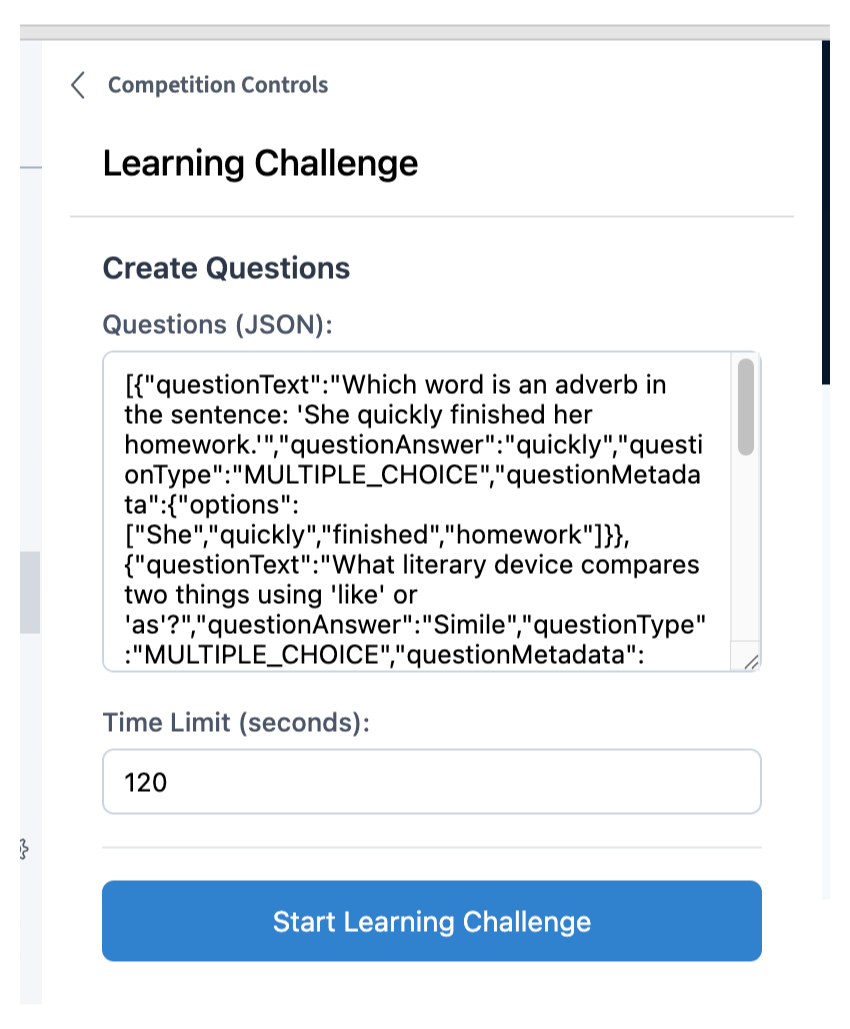
Paste in the JSON list of questions, then set the time limit. In the example below, we pasted in questions about English grammar and set the time limit to 120 seconds, or two minutes.
## 3. Start the challenge
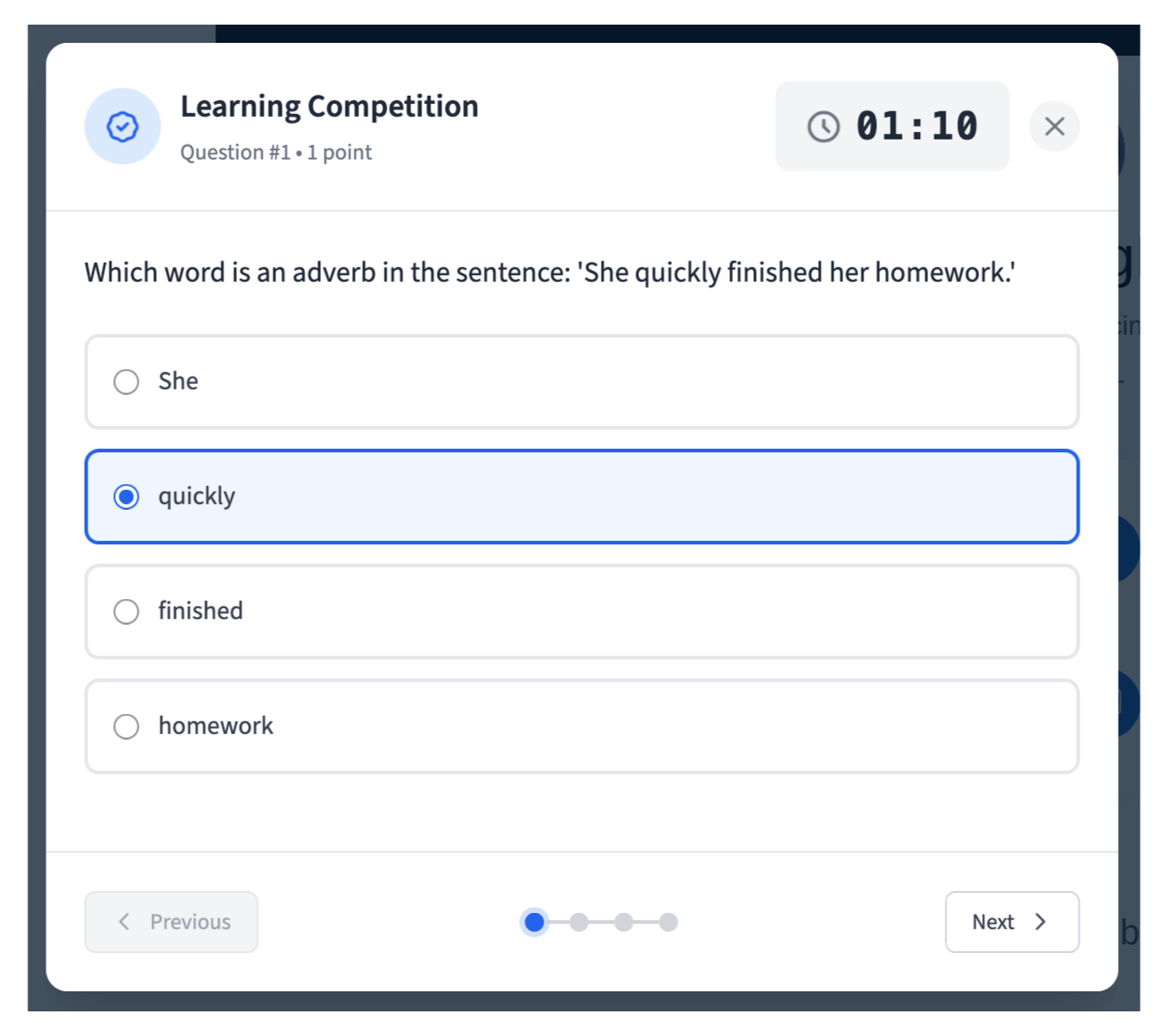
Once you select **Start Challenge**, your students see the first question. They can navigate through the questions and see the time remaining in the upper right-hand corner.
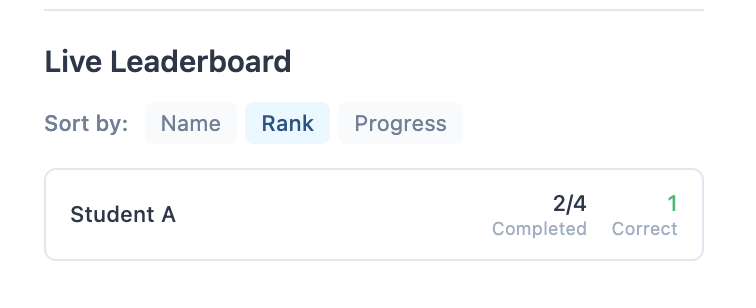
As students answer, you see live analytics for the challenge.
## 4. End the challenge
Once your students have submitted their answers, you see a preview of the results.
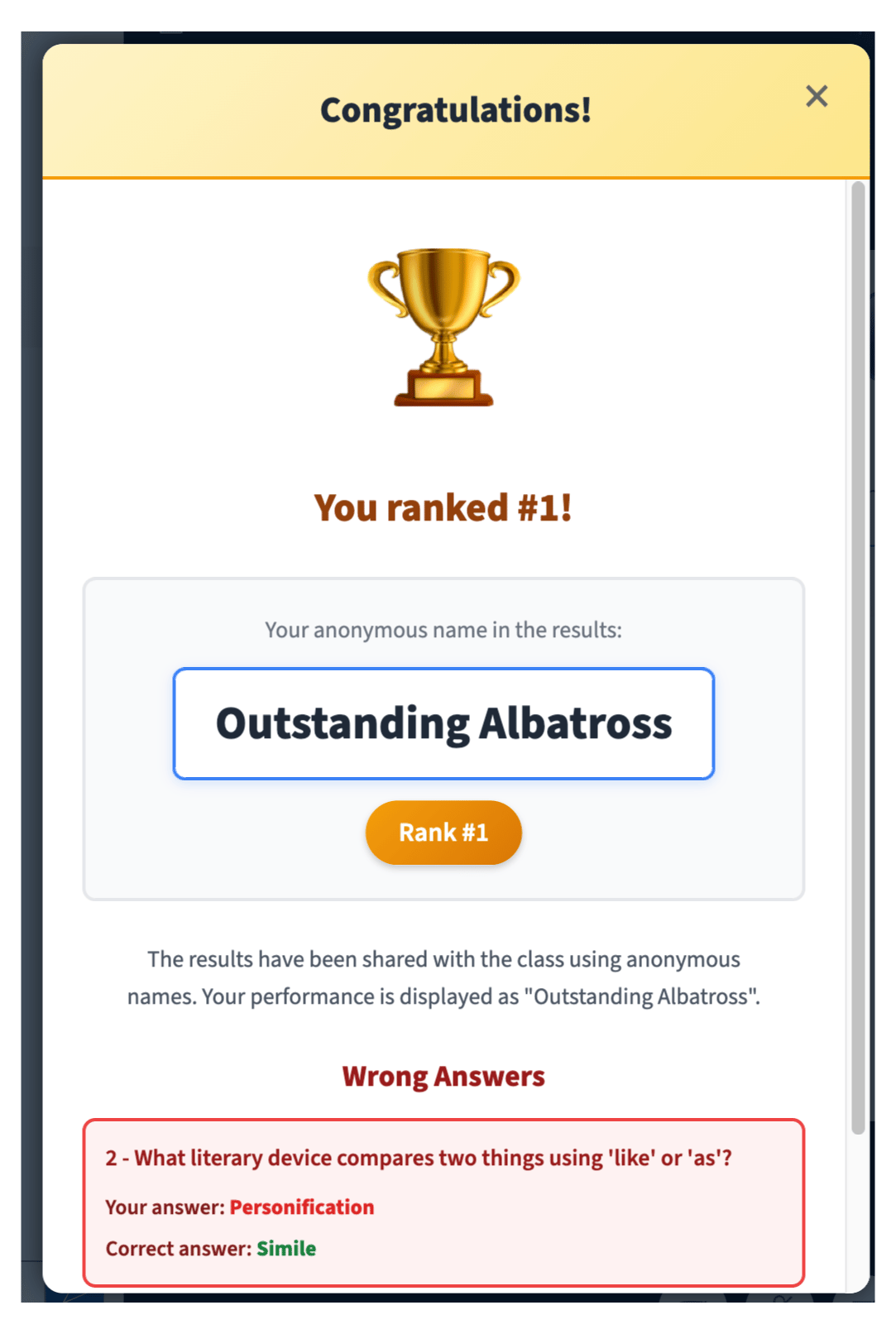
If you select **Share anonymously**, each student is given a randomly generated pseudonym, such as "Eager Butterfly" or "Mighty Seahorse", that only they know. The results are published with everyone's pseudonyms, but each student only knows their own.
Each student sees their pseudonym along with the correct answers for any questions they got wrong.
A typical Learning Challenge takes only a few minutes. You can create a set of challenges ahead of class with a few prompts and have them ready whenever you want to give students a chance to test their knowledge.
The Learning Challenge is low-stakes quizzing. Results do not pass back to the gradebook in your LMS.
 ## 3. Start the challenge
Once you select **Start Challenge**, your students see the first question. They can navigate through the questions and see the time remaining in the upper right-hand corner.
## 3. Start the challenge
Once you select **Start Challenge**, your students see the first question. They can navigate through the questions and see the time remaining in the upper right-hand corner.
 As students answer, you see live analytics for the challenge.
 ## 4. End the challenge
Once your students have submitted their answers, you see a preview of the results.
## 4. End the challenge
Once your students have submitted their answers, you see a preview of the results.
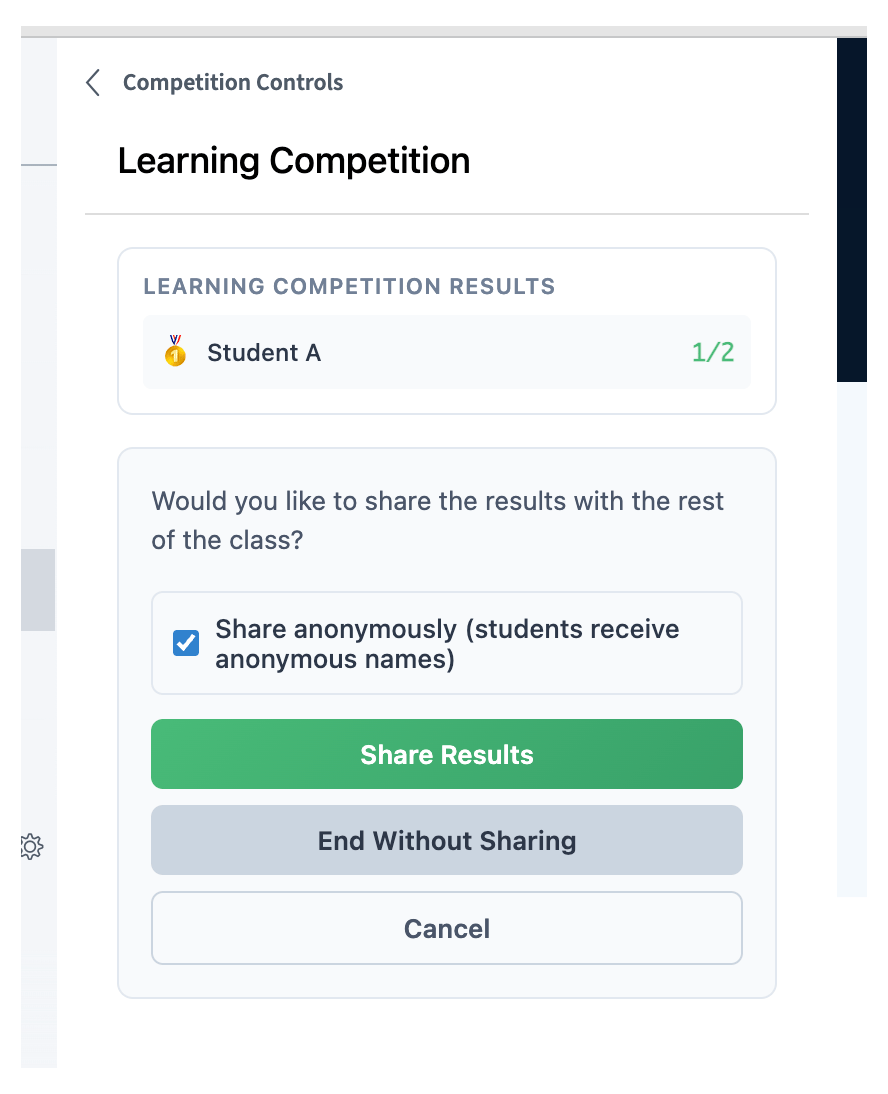 If you select **Share anonymously**, each student is given a randomly generated pseudonym, such as "Eager Butterfly" or "Mighty Seahorse", that only they know. The results are published with everyone's pseudonyms, but each student only knows their own.
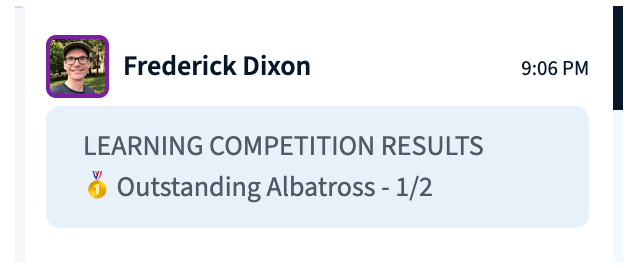 Each student sees their pseudonym along with the correct answers for any questions they got wrong.