> ## Documentation Index
> Fetch the complete documentation index at: https://bigbluebutton.com/docs/llms.txt
> Use this file to discover all available pages before exploring further.
# How do I use the multi-user whiteboard
> When the presenter enables the multi-user whiteboard, all users in the BigBlueButton session can annotate the whiteboard simultaneously.
The presenter can [enable the multi-user whiteboard](#enable-the-multi-user-whiteboard) so every user in the session can annotate at the same time. Once enabled, everyone has access to the [styles toolbar](#use-the-styles-toolbar) for changing how annotations look, the [tools toolbar](#use-the-tools-toolbar) for drawing and selecting, and the [actions submenu](#use-the-actions-submenu) for arranging objects.
## Enable the multi-user whiteboard
To turn on multi-user mode, select the **multi-user whiteboard** button on the toolbar.
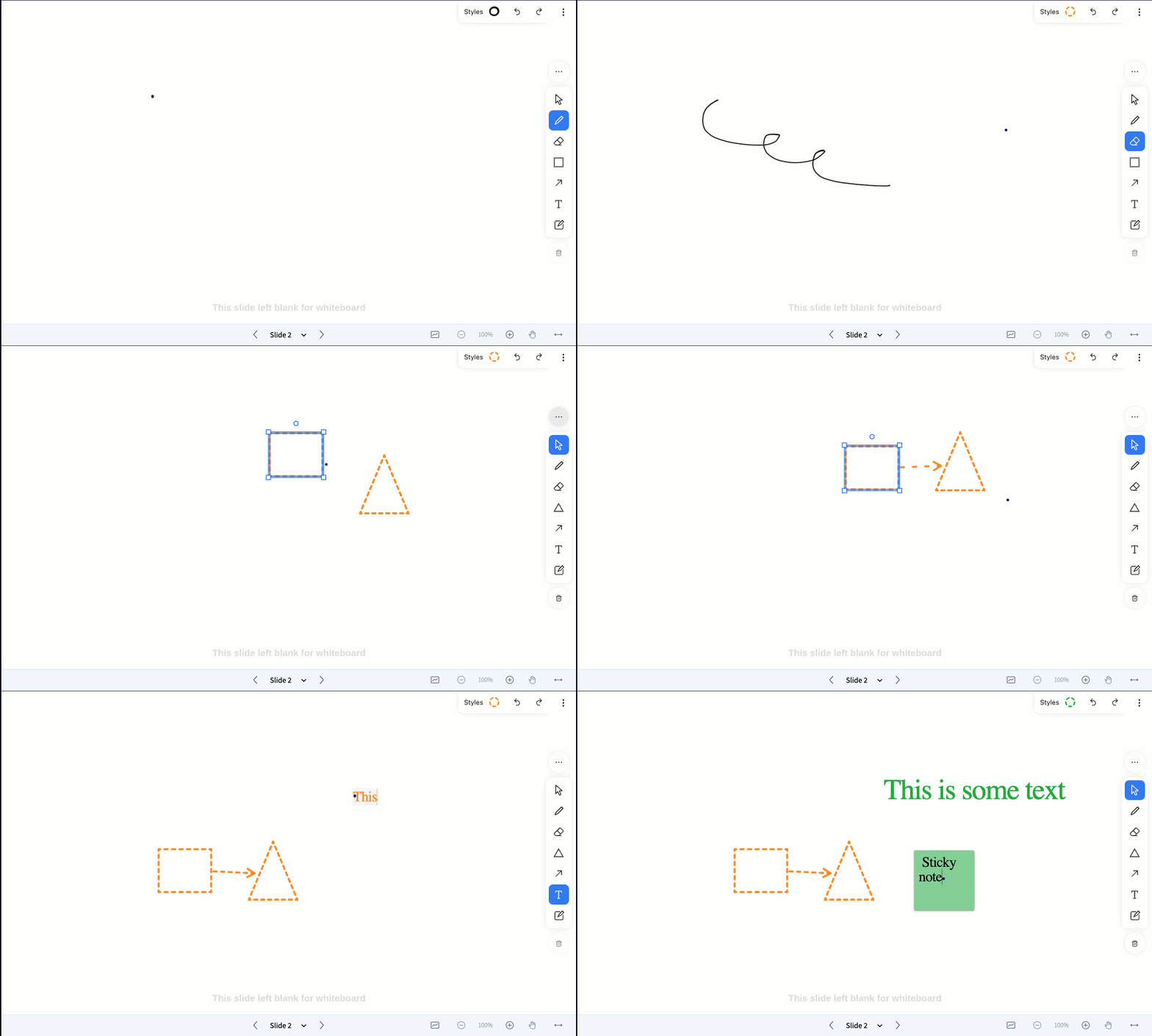
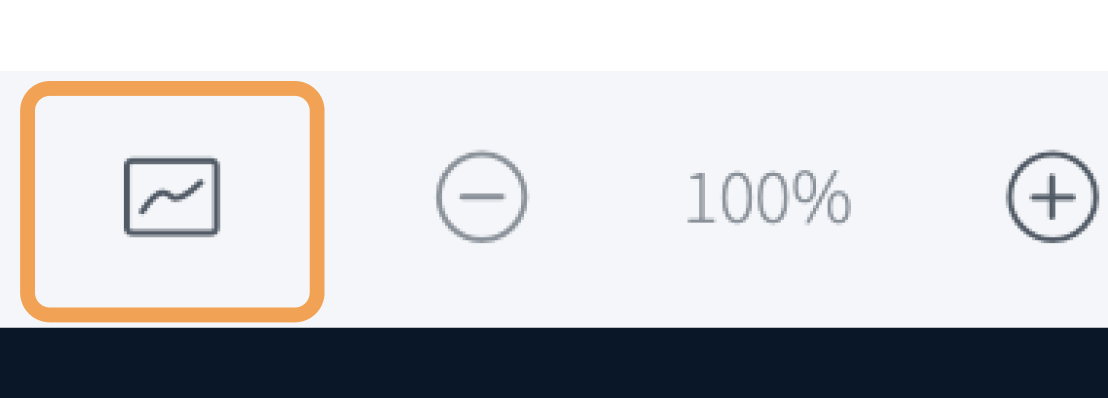 The whiteboard controls appear on the right-hand side of the presentation area, and all users can now annotate the slide.
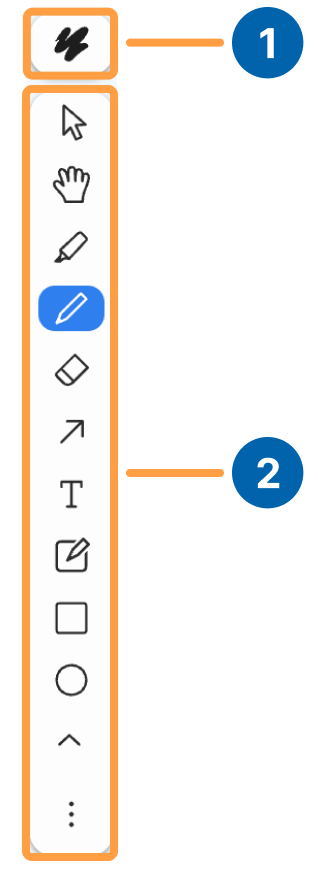
 The whiteboard provides two toolbars: a **Styles toolbar** **\[1]** for changing how annotations look, and a **Tools toolbar** **\[2]** for selecting, drawing, and arranging.

 ## Use the styles toolbar
The **Styles toolbar** controls the appearance of your annotations — color, fill, opacity, dash pattern, and size — along with undo and redo.
## Use the styles toolbar
The **Styles toolbar** controls the appearance of your annotations — color, fill, opacity, dash pattern, and size — along with undo and redo.
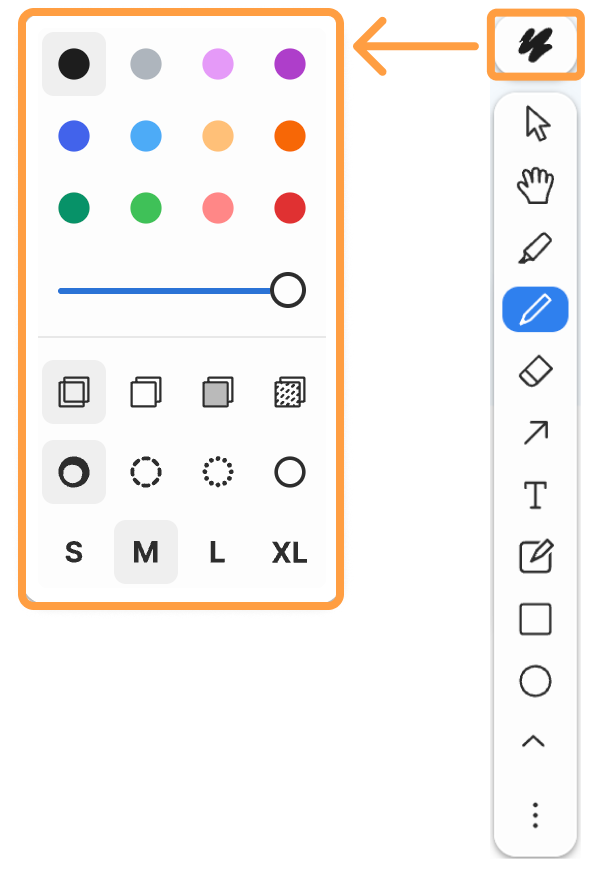
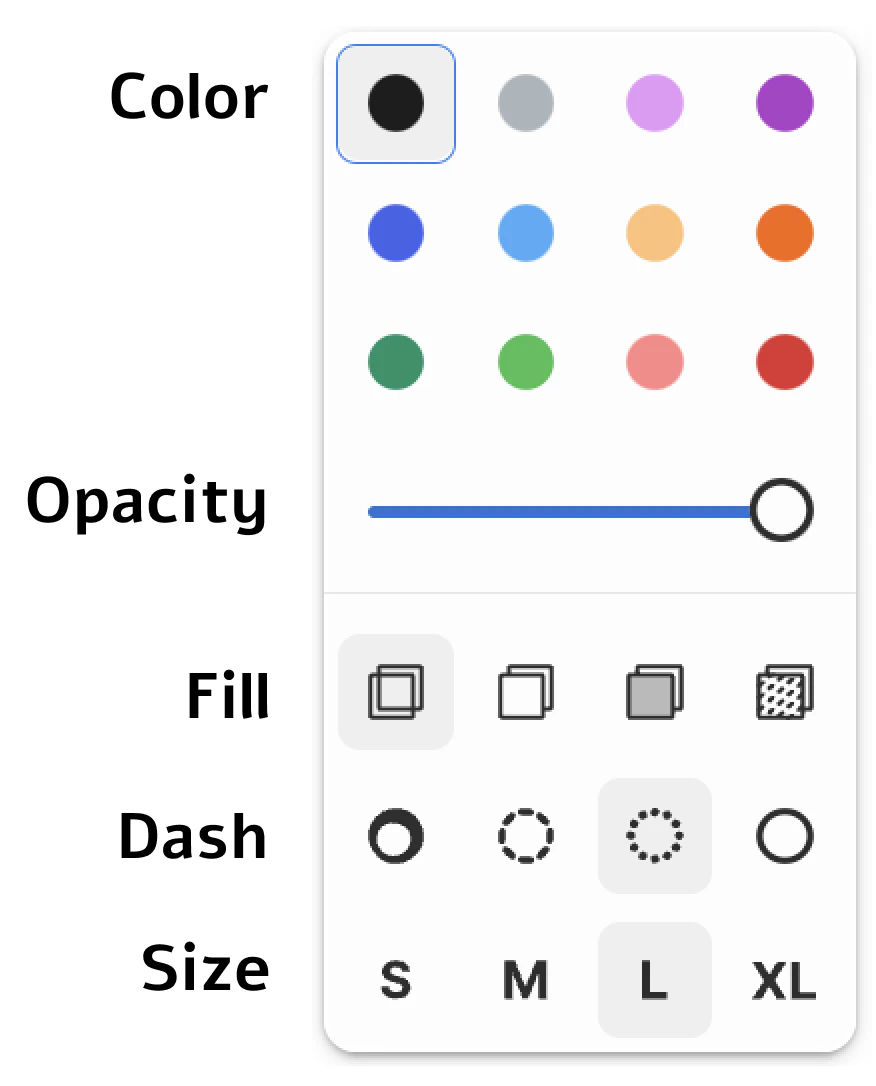 | Control | What it does |
| ----------- | ------------------------------------------------------------------- |
| **Color** | Sets the color of your annotations |
| **Fill** | Fills selected objects with color |
| **Opacity** | Changes the opacity of an object |
| **Dash** | Sets the dash pattern of an object |
| **Size** | Sets the font size: (S)mall, (M)edium, (L)arge, or Extra Large (XL) |
## Use the tools toolbar
The **Tools toolbar** holds the drawing, selection, and shape tools, plus an actions submenu for arranging objects.
| Control | What it does |
| ----------- | ------------------------------------------------------------------- |
| **Color** | Sets the color of your annotations |
| **Fill** | Fills selected objects with color |
| **Opacity** | Changes the opacity of an object |
| **Dash** | Sets the dash pattern of an object |
| **Size** | Sets the font size: (S)mall, (M)edium, (L)arge, or Extra Large (XL) |
## Use the tools toolbar
The **Tools toolbar** holds the drawing, selection, and shape tools, plus an actions submenu for arranging objects.
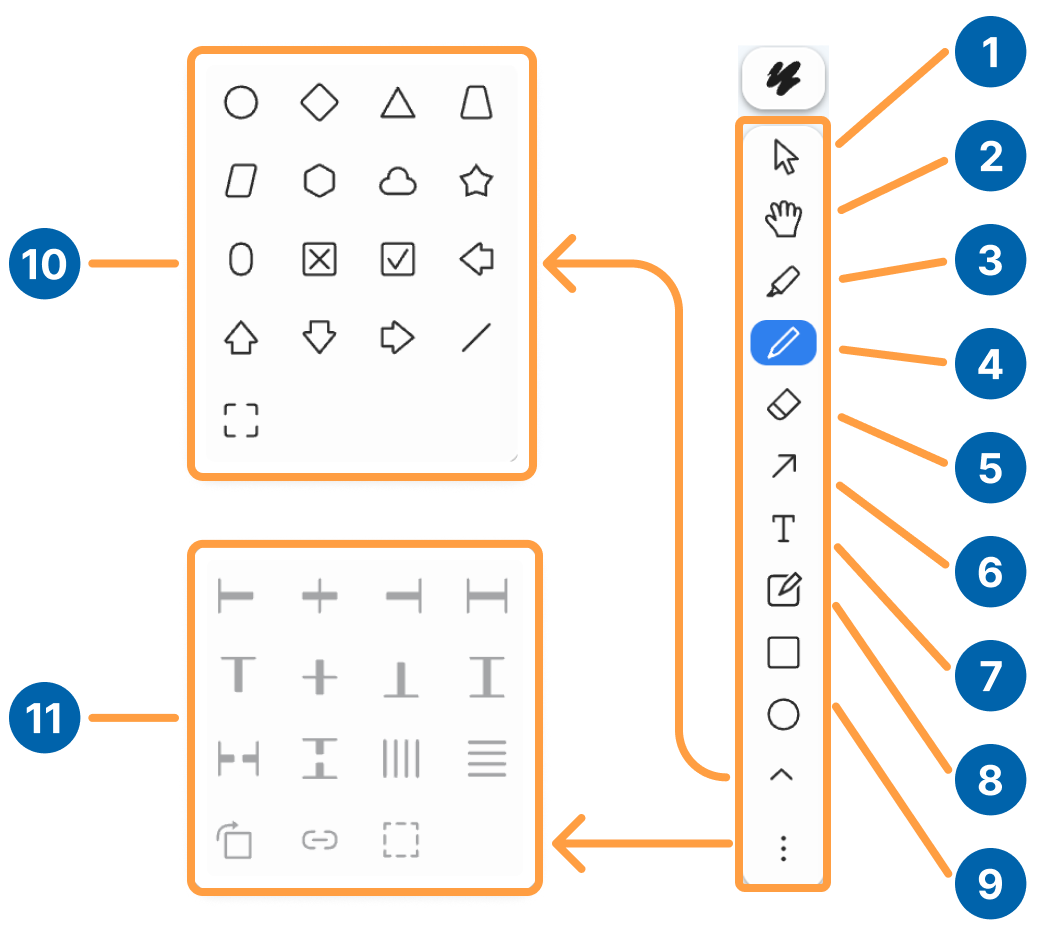 Hold **Shift** to select multiple objects.
| # | Tool | What it does |
| :- | :------------------ | :------------------------------------------------------------------------------------------ |
| 1 | **Selection** | Select annotations |
| 2 | **Hand** | Move your view of the whiteboard |
| 3 | **Pen** | Draw freehand lines |
| 4 | **Highlighter** | Highlight text on the board |
| 5 | **Eraser** | Swipe across objects to erase them |
| 6 | **Arrow** | Draw an arrow |
| 7 | **Text** | Type text |
| 8 | **Sticky Notes** | Place a sticky note to type on |
| 9 | **Shapes** | Place a shape on the whiteboard. To change the shape, open the **Shapes submenu** **\[10]** |
| 10 | **Shapes submenu** | Choose from a range of shapes, use the line tool, or place a frame on the whiteboard |
| 11 | **Actions submenu** | Open the actions submenu (see below) |
### Use the actions submenu
The actions submenu lets you duplicate, rotate, align, group, and re-order objects on the whiteboard.
| Icon | Action |
| ------------------------------------------------------------------------------------------------------------------------------------------------------------------------------------------------------------------------------------------------------------------------------------------------------------------------------------------------------------------------------------------------------------------------------------------------------------------------------------------------------------------------------------------------------------------------------------------------------------------------------------------------------------------------------------------------------------------------------------------------------------------------------------------------------------------------------------------------------------------------------------------------------------------------------------------------------------------------------------------------------------------------------------------------------------------------------------------------------------------------------------------------------------------------------------------------------------------------------------------------------------------------------------------------------------------------------------------------------------------------------------------------------ | ----------------------- |
|
Hold **Shift** to select multiple objects.
| # | Tool | What it does |
| :- | :------------------ | :------------------------------------------------------------------------------------------ |
| 1 | **Selection** | Select annotations |
| 2 | **Hand** | Move your view of the whiteboard |
| 3 | **Pen** | Draw freehand lines |
| 4 | **Highlighter** | Highlight text on the board |
| 5 | **Eraser** | Swipe across objects to erase them |
| 6 | **Arrow** | Draw an arrow |
| 7 | **Text** | Type text |
| 8 | **Sticky Notes** | Place a sticky note to type on |
| 9 | **Shapes** | Place a shape on the whiteboard. To change the shape, open the **Shapes submenu** **\[10]** |
| 10 | **Shapes submenu** | Choose from a range of shapes, use the line tool, or place a frame on the whiteboard |
| 11 | **Actions submenu** | Open the actions submenu (see below) |
### Use the actions submenu
The actions submenu lets you duplicate, rotate, align, group, and re-order objects on the whiteboard.
| Icon | Action |
| ------------------------------------------------------------------------------------------------------------------------------------------------------------------------------------------------------------------------------------------------------------------------------------------------------------------------------------------------------------------------------------------------------------------------------------------------------------------------------------------------------------------------------------------------------------------------------------------------------------------------------------------------------------------------------------------------------------------------------------------------------------------------------------------------------------------------------------------------------------------------------------------------------------------------------------------------------------------------------------------------------------------------------------------------------------------------------------------------------------------------------------------------------------------------------------------------------------------------------------------------------------------------------------------------------------------------------------------------------------------------------------------------------ | ----------------------- |
|  | Duplicate |
|
| Duplicate |
|  | Rotate |
|
| Rotate |
|  | Unlock |
|
| Unlock |
|  | Unlock Aspect Ratio |
|
| Unlock Aspect Ratio |
|  | Group |
|
| Group |
|  | Move to Back |
|
| Move to Back |
|  | Move Backward |
|
| Move Backward |
|  | Move Forward |
|
| Move Forward |
|  | Move to Front |
|
| Move to Front |
|  | Reset Angle |
|
| Reset Angle |
|  | Align Left |
|
| Align Left |
|  | Align Horizontal Center |
|
| Align Horizontal Center |
|  | Align Right |
|
| Align Right |
|  | Stretch Horizontal |
|
| Stretch Horizontal |
|  | Distribute Horizontal |
|
| Distribute Horizontal |
|  | Align Top |
|
| Align Top |
|  | Align Vertical Center |
|
| Align Vertical Center |
|  | Align Bottom |
|
| Align Bottom |
|  | Stretch Vertical |
|
| Stretch Vertical |
|  | Distribute Vertical |