> ## Documentation Index
> Fetch the complete documentation index at: https://bigbluebutton.com/docs/llms.txt
> Use this file to discover all available pages before exploring further.
# Access the Options Menu
> Any user can access additional settings, information, and assistance through the options menu.
Any user can access additional settings, information, and assistance through the options menu in the upper-right corner of the BigBlueButton interface. Use it to set [away status](#away-status), open [settings](#settings), view [about](#about) info, find [help](#help), or see [keyboard shortcuts](#keyboard-shortcuts).
To open the menu, select the three dots (kebab menu) in the upper right-hand corner.
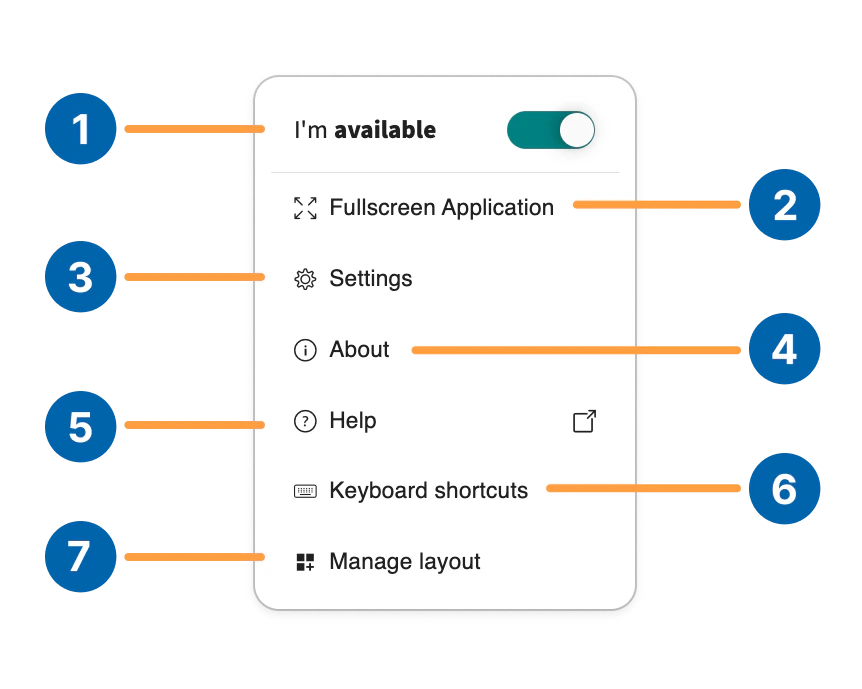 There are several options available within the Menu:
* [**Away Status \[1\]**](#away-status) — updates user presence
* **Make full screen \[2]** — enables full screen mode
* [**Settings \[3\]**](#settings) — access additional application settings
* [**About \[4\]**](#about) — BigBlueButton copyright and build information
* [**Help \[5\]**](#help) — access tutorial videos
* [**Keyboard shortcuts \[6\]**](#keyboard-shortcuts) — provides a list of hotkeys for quick keyboard navigation
## Away Status
Setting to **away** will (a) pause your webcam, (b) mute your microphone, and (c) let everyone know in the chat you are away - all with a single click.
## Settings
The **Settings** menu houses several features that a user can enable or disable to customize their experience in the BigBlueButton session.
Subsections of the settings menu include the [**applications**](#application-menu) menu and [**data savings**](#data-savings) menu.
### Application menu
There are several options available within the Menu:
* [**Away Status \[1\]**](#away-status) — updates user presence
* **Make full screen \[2]** — enables full screen mode
* [**Settings \[3\]**](#settings) — access additional application settings
* [**About \[4\]**](#about) — BigBlueButton copyright and build information
* [**Help \[5\]**](#help) — access tutorial videos
* [**Keyboard shortcuts \[6\]**](#keyboard-shortcuts) — provides a list of hotkeys for quick keyboard navigation
## Away Status
Setting to **away** will (a) pause your webcam, (b) mute your microphone, and (c) let everyone know in the chat you are away - all with a single click.
## Settings
The **Settings** menu houses several features that a user can enable or disable to customize their experience in the BigBlueButton session.
Subsections of the settings menu include the [**applications**](#application-menu) menu and [**data savings**](#data-savings) menu.
### Application menu
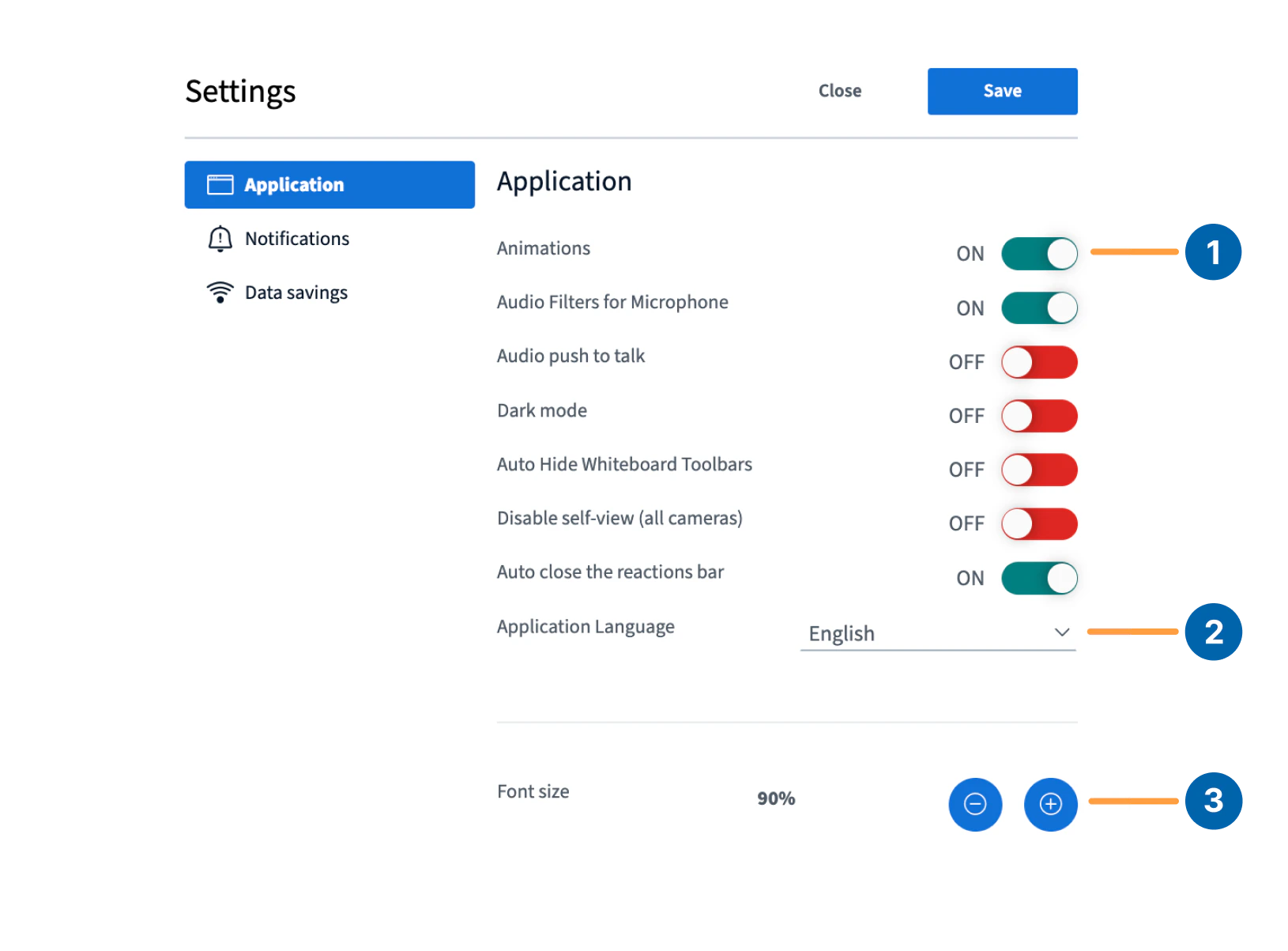 By default, the Application menu is expanded; a user can make changes to the BigBlueButton **Animations \[1]** (enabled by default).
To change the default language, select from the list of available languages found in the **Application Language \[2]** dropdown.
You can also change the application **Font Size \[3]**. To make the font larger, select the **+** and to decrease the font size, select the **-**.
By default, the Application menu is expanded; a user can make changes to the BigBlueButton **Animations \[1]** (enabled by default).
To change the default language, select from the list of available languages found in the **Application Language \[2]** dropdown.
You can also change the application **Font Size \[3]**. To make the font larger, select the **+** and to decrease the font size, select the **-**.
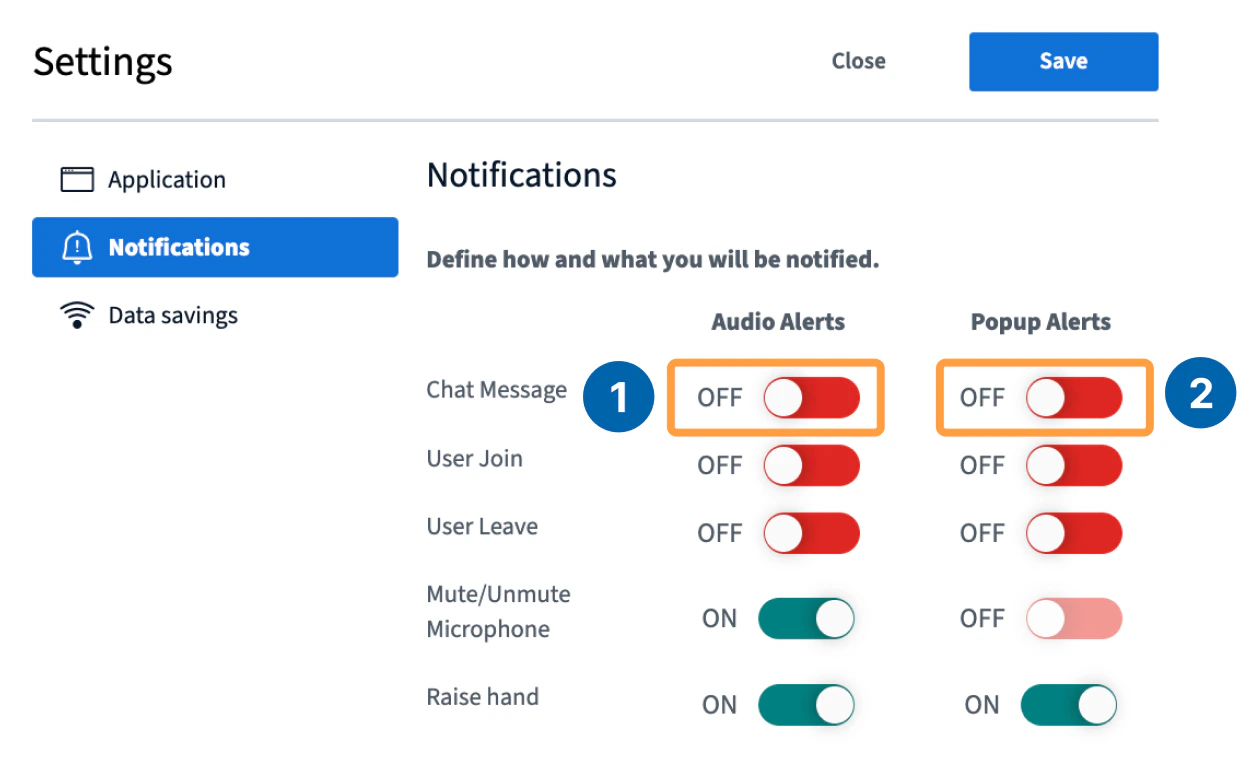 Enable **Audio alerts \[4]**, and **Popup alerts \[5]** to notify you of new incoming chat messages while in the BigBlueButton session and when your chat pane or users list is minimized.
All alerts are in-browser only and do not behave like desktop push notifications.
Select **Save** to apply any changes made or **Close** to return to the session.
### Data Savings
Settings found within the Data Savings menu are intended for users who are connecting from a mobile device or those connecting to networks performing under the recommended bandwidth requirements for optimal use of BigBlueButton.
Enable **Audio alerts \[4]**, and **Popup alerts \[5]** to notify you of new incoming chat messages while in the BigBlueButton session and when your chat pane or users list is minimized.
All alerts are in-browser only and do not behave like desktop push notifications.
Select **Save** to apply any changes made or **Close** to return to the session.
### Data Savings
Settings found within the Data Savings menu are intended for users who are connecting from a mobile device or those connecting to networks performing under the recommended bandwidth requirements for optimal use of BigBlueButton.
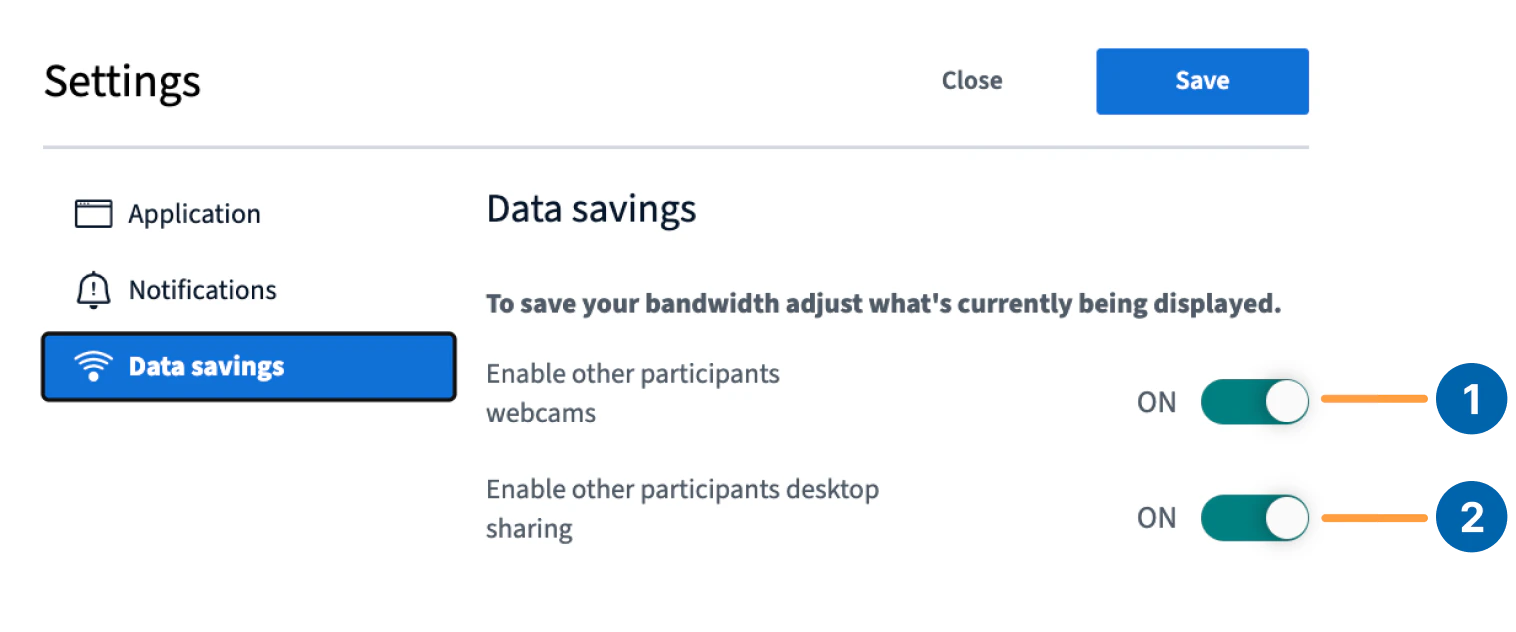 By default both the **Webcam \[1]** and **Desktop Sharing \[2]** streams are enabled.
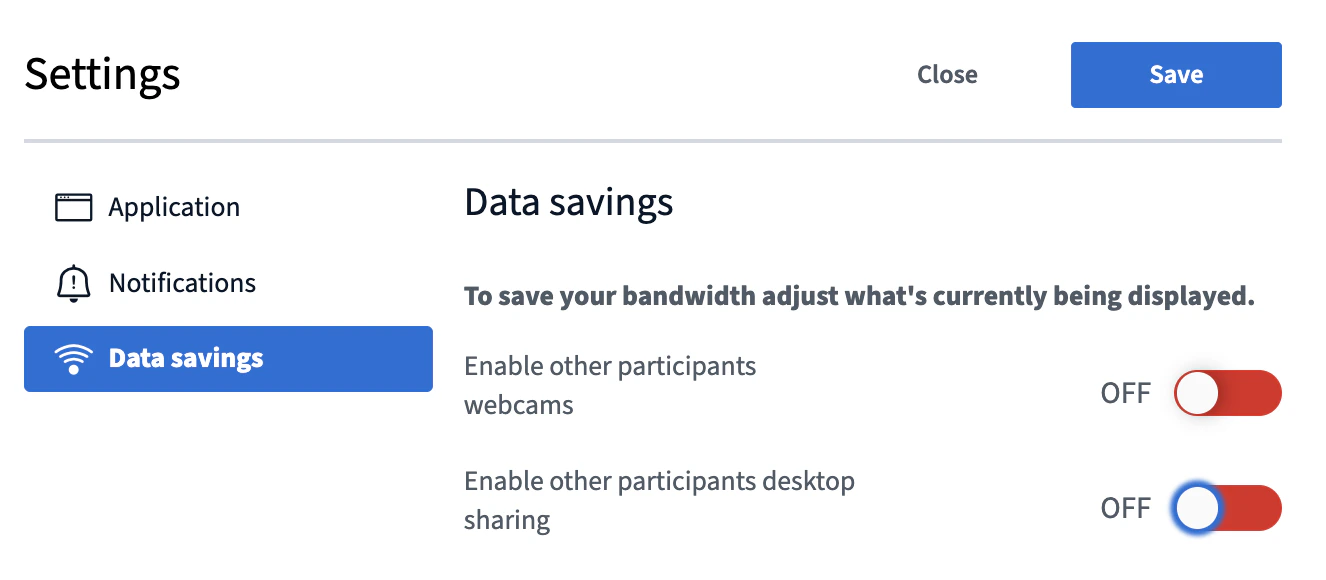 To conserve bandwidth, toggle **off**. When turned off, any incoming or outgoing webcam or desktop sharing streams stop appearing.
### Dark Mode
To enable dark mode, switch the toggle **on** from the \*\*Application settings \*\*menu.
To conserve bandwidth, toggle **off**. When turned off, any incoming or outgoing webcam or desktop sharing streams stop appearing.
### Dark Mode
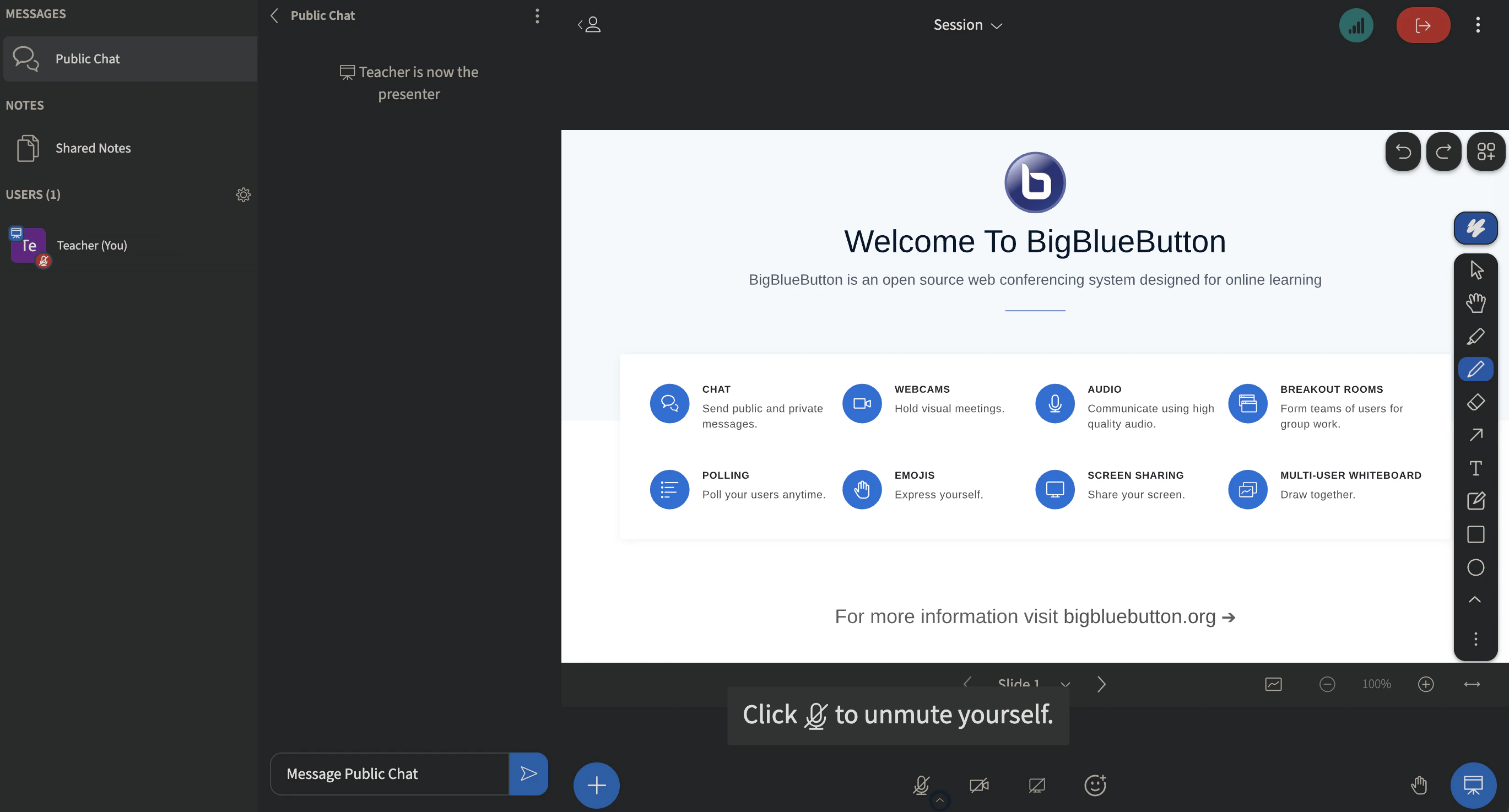
To enable dark mode, switch the toggle **on** from the \*\*Application settings \*\*menu.
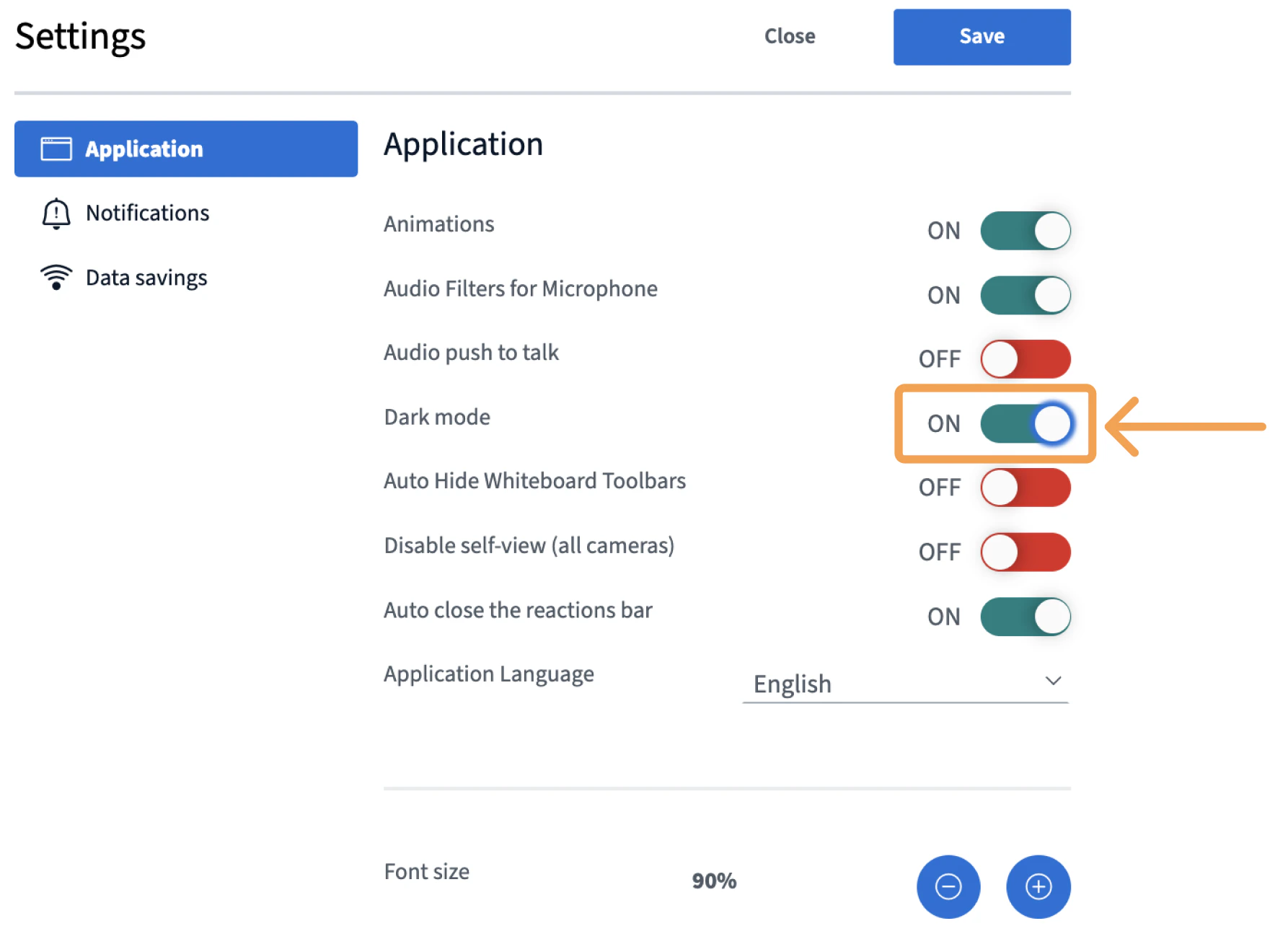 Your interface will appear as displayed:
 ## About
The about section houses the BigBlueButton copyright information and build number.
## About
The about section houses the BigBlueButton copyright information and build number.
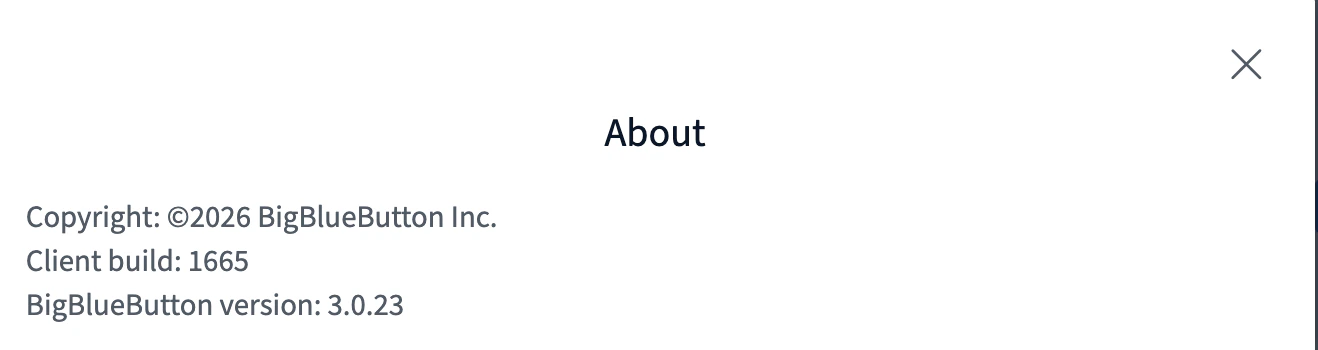 You may be asked to provide the **Client build number** of the session you are connected to for troubleshooting. It appears under the copyright information.
## Help
The help button redirects you to specific [help articles](https://bigbluebutton.org/tutorials/) that assist with FAQs and other troubleshooting tips.
## Keyboard Shortcuts
The Keyboard shortcuts menu provides a listing of all the shortcut keys that can be used to navigate the BigBlueButton interface.
**Keyboard Shortcuts for Windows**
| Function | Combo |
| ------------------------------------------- | -------------- |
| Join audio | Alt + J |
| Toggle Raise Hand | Alt + R |
| Leave audio | Alt + L |
| Hold for Push-to-talk | M |
| Mute / Unmute | Alt + M |
| Open actions menu | Alt + A |
| Open Options | Alt + O |
| Open leave meeting menu | Alt + X |
| Toggle UserList | Alt + U |
| Hide private chat | Alt + H |
| Open debug window | Alt + K |
| Close private chat | Alt + G |
| Toggle Public Chat (User list must be open) | Alt + P |
| Open custom poll | Ctrl + Alt + P |
| Function | Combo |
| ------------------------------ | ----------- |
| Activate Pan tool (Presenter) | Spacebar |
| Toggle Full-screen (Presenter) | Enter |
| Next slide (Presenter) | Right Arrow |
| Previous slide (Presenter) | Left Arrow |
| Function | Combo | Alternative |
| ----------------- | ------------ | ------------------ |
| Select Tool | 1 | V |
| Pencil | 2 | D, P |
| Eraser | 3 | E |
| Rectangle | 4 | R |
| Ellipse | 5 | O |
| Triangle | 6 | G |
| Line | 7 | L |
| Arrow | 8 | A |
| Text Tool | 9 | T |
| Sticky Note | 0 | N, S |
| Hand | | H |
| Highlight | | Shift D |
| Zoom In | Ctrl + | Ctrl M. Wheel up |
| Zoom Out | Ctrl - | Ctrl M. Wheel down |
| Reset Zoom | Shift 1 | N/A |
| Zoom to Selection | Shift 2 | N/A |
| Flip Horizontal | Shift H | N/A |
| Flip Vertical | Shift V | N/A |
| Lock / Unlock | Ctrl Shift L | N/A |
| Move to Front | Shift ] | N/A |
| Move Forward | ] | N/A |
| Move Backward | \[ | N/A |
| Move to Back | Shift \[ | N/A |
| Undo | Ctrl Z | N/A |
| Redo | Ctrl Shift Z | N/A |
| Cut | Ctrl X | N/A |
| Copy | Ctrl C | N/A |
| Paste | Ctrl V | N/A |
| Select All | Ctrl A | N/A |
| Delete | Del | Backspace |
| Duplicate | Ctrl D | N/A |
| Function | Combo |
| -------- | ------------ |
| Undo | 2-finger tap |
| Redo | 3-finger tap |
**Keyboard Shortcuts for Mac**
| Function | Combo |
| ------------------------------------------- | -------------------- |
| Join audio | Control + Option + J |
| Toggle Raise Hand | Control + Option + R |
| Leave audio | Control + Option + L |
| Hold for Push-to-talk | M |
| Mute / Unmute | Control + Option + M |
| Open actions menu | Control + Option + A |
| Open Options | Control + Option + O |
| Open leave meeting menu | Control + Option + X |
| Toggle UserList | Control + Option + U |
| Hide private chat | Control + Option + H |
| Open debug window | Control + Option + K |
| Close private chat | Control + Option + G |
| Toggle Public Chat (User list must be open) | Control + Option + P |
| Open custom poll | Control + Option + P |
| Function | Combo |
| ------------------------------ | ----------- |
| Activate Pan tool (Presenter) | Spacebar |
| Toggle Full-screen (Presenter) | Enter |
| Next slide (Presenter) | Right Arrow |
| Previous slide (Presenter) | Left Arrow |
| Function | Combo | Alternative |
| ----------------- | ----------- | ----------------- |
| Select Tool | 1 | V |
| Pencil | 2 | D, P |
| Eraser | 3 | E |
| Rectangle | 4 | R |
| Ellipse | 5 | O |
| Triangle | 6 | G |
| Line | 7 | L |
| Arrow | 8 | A |
| Text Tool | 9 | T |
| Sticky Note | 0 | N, S |
| Hand | | H |
| Highlight | | Shift D |
| Zoom In | Cmd + | Cmd M. Wheel up |
| Zoom Out | Cmd - | Cmd M. Wheel down |
| Reset Zoom | Shift 1 | N/A |
| Zoom to Selection | Shift 2 | N/A |
| Flip Horizontal | Shift H | N/A |
| Flip Vertical | Shift V | N/A |
| Lock / Unlock | Cmd Shift L | N/A |
| Move to Front | Shift ] | N/A |
| Move Forward | ] | N/A |
| Move Backward | \[ | N/A |
| Move to Back | Shift \[ | N/A |
| Undo | Cmd Z | N/A |
| Redo | Cmd Shift Z | N/A |
| Cut | Cmd X | N/A |
| Copy | Cmd C | N/A |
| Paste | Cmd V | N/A |
| Select All | Cmd A | N/A |
| Delete | Del | Backspace |
| Duplicate | Cmd D | N/A |
| Function | Combo |
| -------- | ------------ |
| Undo | 2-finger tap |
| Redo | 3-finger tap |
You may be asked to provide the **Client build number** of the session you are connected to for troubleshooting. It appears under the copyright information.
## Help
The help button redirects you to specific [help articles](https://bigbluebutton.org/tutorials/) that assist with FAQs and other troubleshooting tips.
## Keyboard Shortcuts
The Keyboard shortcuts menu provides a listing of all the shortcut keys that can be used to navigate the BigBlueButton interface.
**Keyboard Shortcuts for Windows**
| Function | Combo |
| ------------------------------------------- | -------------- |
| Join audio | Alt + J |
| Toggle Raise Hand | Alt + R |
| Leave audio | Alt + L |
| Hold for Push-to-talk | M |
| Mute / Unmute | Alt + M |
| Open actions menu | Alt + A |
| Open Options | Alt + O |
| Open leave meeting menu | Alt + X |
| Toggle UserList | Alt + U |
| Hide private chat | Alt + H |
| Open debug window | Alt + K |
| Close private chat | Alt + G |
| Toggle Public Chat (User list must be open) | Alt + P |
| Open custom poll | Ctrl + Alt + P |
| Function | Combo |
| ------------------------------ | ----------- |
| Activate Pan tool (Presenter) | Spacebar |
| Toggle Full-screen (Presenter) | Enter |
| Next slide (Presenter) | Right Arrow |
| Previous slide (Presenter) | Left Arrow |
| Function | Combo | Alternative |
| ----------------- | ------------ | ------------------ |
| Select Tool | 1 | V |
| Pencil | 2 | D, P |
| Eraser | 3 | E |
| Rectangle | 4 | R |
| Ellipse | 5 | O |
| Triangle | 6 | G |
| Line | 7 | L |
| Arrow | 8 | A |
| Text Tool | 9 | T |
| Sticky Note | 0 | N, S |
| Hand | | H |
| Highlight | | Shift D |
| Zoom In | Ctrl + | Ctrl M. Wheel up |
| Zoom Out | Ctrl - | Ctrl M. Wheel down |
| Reset Zoom | Shift 1 | N/A |
| Zoom to Selection | Shift 2 | N/A |
| Flip Horizontal | Shift H | N/A |
| Flip Vertical | Shift V | N/A |
| Lock / Unlock | Ctrl Shift L | N/A |
| Move to Front | Shift ] | N/A |
| Move Forward | ] | N/A |
| Move Backward | \[ | N/A |
| Move to Back | Shift \[ | N/A |
| Undo | Ctrl Z | N/A |
| Redo | Ctrl Shift Z | N/A |
| Cut | Ctrl X | N/A |
| Copy | Ctrl C | N/A |
| Paste | Ctrl V | N/A |
| Select All | Ctrl A | N/A |
| Delete | Del | Backspace |
| Duplicate | Ctrl D | N/A |
| Function | Combo |
| -------- | ------------ |
| Undo | 2-finger tap |
| Redo | 3-finger tap |
**Keyboard Shortcuts for Mac**
| Function | Combo |
| ------------------------------------------- | -------------------- |
| Join audio | Control + Option + J |
| Toggle Raise Hand | Control + Option + R |
| Leave audio | Control + Option + L |
| Hold for Push-to-talk | M |
| Mute / Unmute | Control + Option + M |
| Open actions menu | Control + Option + A |
| Open Options | Control + Option + O |
| Open leave meeting menu | Control + Option + X |
| Toggle UserList | Control + Option + U |
| Hide private chat | Control + Option + H |
| Open debug window | Control + Option + K |
| Close private chat | Control + Option + G |
| Toggle Public Chat (User list must be open) | Control + Option + P |
| Open custom poll | Control + Option + P |
| Function | Combo |
| ------------------------------ | ----------- |
| Activate Pan tool (Presenter) | Spacebar |
| Toggle Full-screen (Presenter) | Enter |
| Next slide (Presenter) | Right Arrow |
| Previous slide (Presenter) | Left Arrow |
| Function | Combo | Alternative |
| ----------------- | ----------- | ----------------- |
| Select Tool | 1 | V |
| Pencil | 2 | D, P |
| Eraser | 3 | E |
| Rectangle | 4 | R |
| Ellipse | 5 | O |
| Triangle | 6 | G |
| Line | 7 | L |
| Arrow | 8 | A |
| Text Tool | 9 | T |
| Sticky Note | 0 | N, S |
| Hand | | H |
| Highlight | | Shift D |
| Zoom In | Cmd + | Cmd M. Wheel up |
| Zoom Out | Cmd - | Cmd M. Wheel down |
| Reset Zoom | Shift 1 | N/A |
| Zoom to Selection | Shift 2 | N/A |
| Flip Horizontal | Shift H | N/A |
| Flip Vertical | Shift V | N/A |
| Lock / Unlock | Cmd Shift L | N/A |
| Move to Front | Shift ] | N/A |
| Move Forward | ] | N/A |
| Move Backward | \[ | N/A |
| Move to Back | Shift \[ | N/A |
| Undo | Cmd Z | N/A |
| Redo | Cmd Shift Z | N/A |
| Cut | Cmd X | N/A |
| Copy | Cmd C | N/A |
| Paste | Cmd V | N/A |
| Select All | Cmd A | N/A |
| Delete | Del | Backspace |
| Duplicate | Cmd D | N/A |
| Function | Combo |
| -------- | ------------ |
| Undo | 2-finger tap |
| Redo | 3-finger tap |