> ## Documentation Index
> Fetch the complete documentation index at: https://bigbluebutton.com/docs/llms.txt
> Use this file to discover all available pages before exploring further.
# Room settings
> Configure room-specific settings such as the welcome message, wait for moderator, and whether the session can be recorded.
Once you have created a BigBlueButton activity, you can access additional room settings.
## Common room settings
These settings commonly include:
* a custom welcome message
* **Wait for moderator**
* whether the session can be recorded
## Custom welcome message
Adding a welcome message replaces the default message shown in the room chat when users enter.
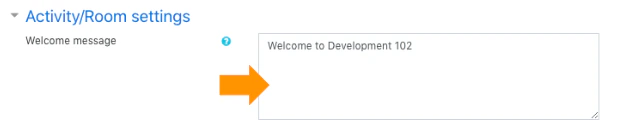 We recommend:
* avoiding pasted content directly from word processors like Microsoft Word
* using plain text or a simple text editor if formatting issues appear
* being careful with special characters if your site has had HTML formatting issues in this field
## Wait for moderator
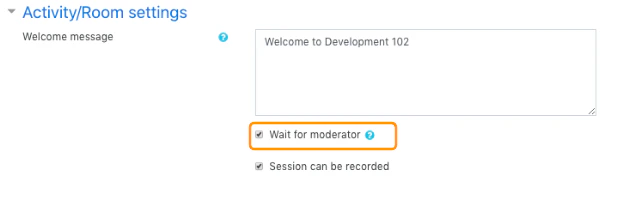
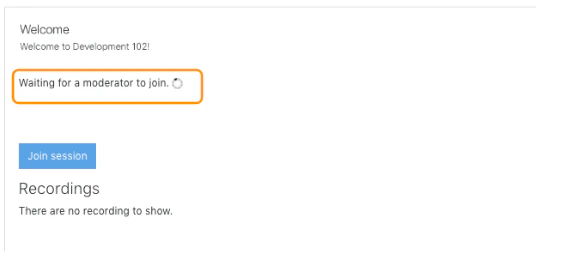
When **Wait for moderator** is enabled, viewers cannot enter the room until a moderator joins.
That means students will see a waiting message until the teacher or another moderator opens the room.
We recommend:
* avoiding pasted content directly from word processors like Microsoft Word
* using plain text or a simple text editor if formatting issues appear
* being careful with special characters if your site has had HTML formatting issues in this field
## Wait for moderator
When **Wait for moderator** is enabled, viewers cannot enter the room until a moderator joins.
That means students will see a waiting message until the teacher or another moderator opens the room.
 ## Session recording
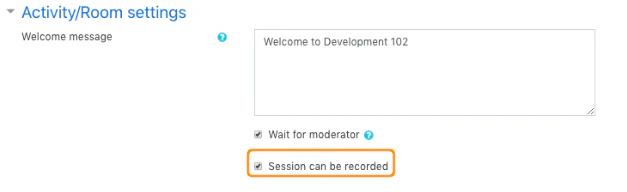
When the room is configured to be recorded, moderators can use the recording controls during the live session.
If the **Session can be recorded** option is disabled, the Start/Stop Recording button does not appear and the server will not record the session.
## Session recording
When the room is configured to be recorded, moderators can use the recording controls during the live session.
If the **Session can be recorded** option is disabled, the Start/Stop Recording button does not appear and the server will not record the session.
 ## Related pages
* [Recording settings](/docs/integrations/moodle/teachers/recording-settings)
* [Schedule a session](/docs/integrations/moodle/teachers/schedule-session)
* [Manage recordings](/docs/integrations/moodle/teachers/recordings)
## Related pages
* [Recording settings](/docs/integrations/moodle/teachers/recording-settings)
* [Schedule a session](/docs/integrations/moodle/teachers/schedule-session)
* [Manage recordings](/docs/integrations/moodle/teachers/recordings)