If you are a student, go to the Student Guide.
As a teacher, the fist — and best step — to get started is watch watch the first two tutorial videos. The first video covers the basics of BigBlueButton from a learner’s perspecitve: how to share audio and video, respond to chat and polls, use the whiteboard, etc. The second video builds on the first and covers demonstrates how to use BigBlueButton’s capabilties to teach students.

The Big Picture

To help you get started improving learning outcomes in your virtual classess, we’ve organized this documentation according to best practices broken down into three stages:
  1. Prepare (before the class),
  2. Teach (using BigBlueButton), and
  3. Reflect (review class and plan for next).
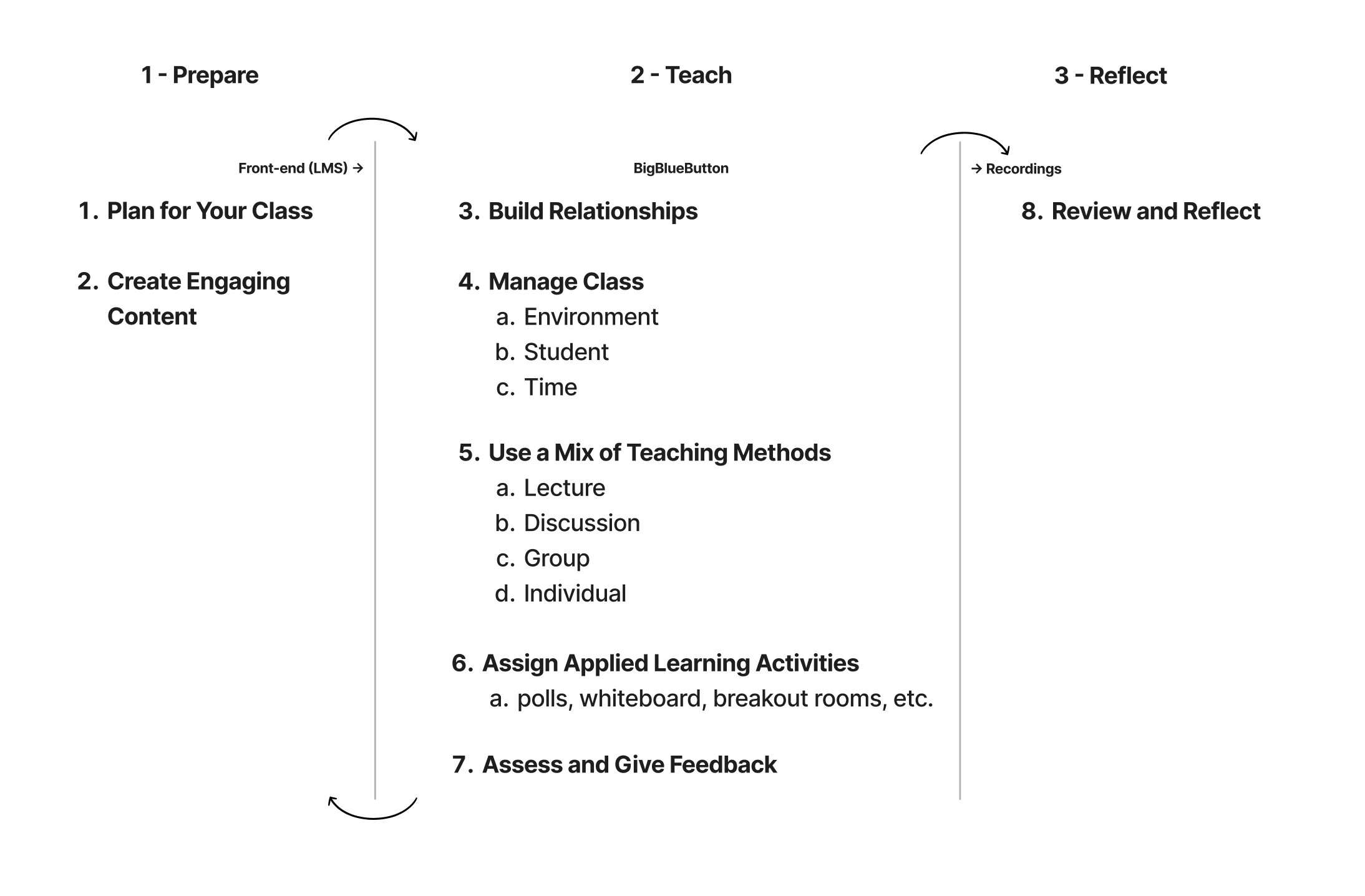
The following diagram breaks down the key activities at each stage.
Three-step teaching process: Prepare, Teach,
Use the navigation at the top of this documentation, or the user interface below to quickly jump to specific sections.

Set Up Your Room

Create rooms, configure settings, and invite participants.

Create Engaging Content

Upload presentations and set up Smart Slides for polling.
Looking for a specific feature? You can use the search at the top, as a question of the docs with AI, and check out the Educator Quick Reference links to help docs for the most common actions.