

Open the gallery
Select Apps. The gallery opens with the apps available in your session.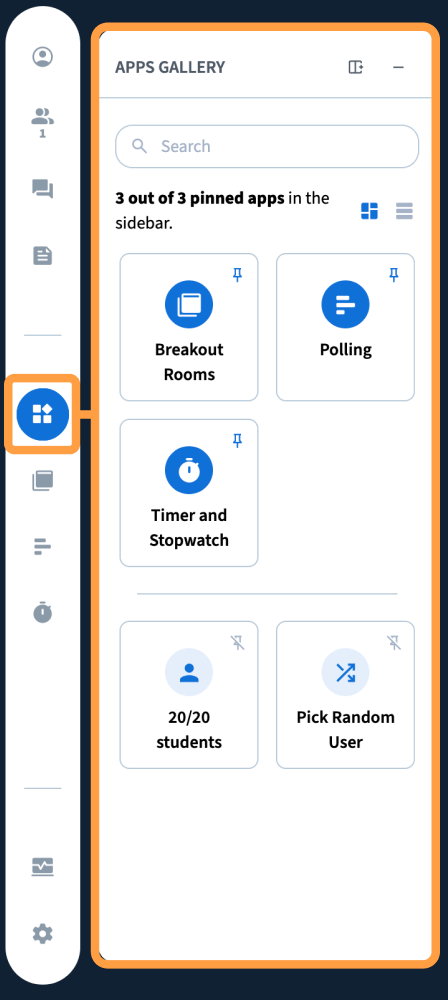
Pin the apps you use
Select the pin icon on an app to pin it to the left side. Pinned apps stay there, so you can switch back and forth between them the same way you switch between the user list, chat, and shared notes.What’s in the gallery
Breakout rooms
Breakout rooms
Breakout rooms now open inside a panel rather than a dialog. Assign people by dragging their names from the user list, or use randomly assign to shuffle them. Set the duration at the top, choose the slides each room starts with, and turn on the options to bring back the breakout room whiteboards and shared notes.Once the rooms are running, you can see who has joined each one, join a room yourself, send a message to all rooms, and finish all the rooms.
Polling and quizzing
Polling and quizzing
Polling works as it did in 3.0 — the same interface for running a poll or a quiz.
Timer
Timer
The timer has a new look with quick-start options. Once started, it appears in the upper-right corner of the session, and deactivating it closes it.
Learning analytics dashboard
Learning analytics dashboard
The dashboard is more prominent in 4.0. It shows everyone in the session with their activity score, lets you rank them, and shows their responses to polls and quizzes.
Which apps you see depends on your role and on what your administrator has enabled.